Bizora ERP
Business control in one desktop ERP
Accounting, inventory, procurement, invoicing, payroll and reporting — all in one private, offline-first platform on your own machines. No cloud lock-in. No monthly billing.
One platform, one source of truth
Everything your business runs on — in a single desktop app
A goods receipt, a customer invoice and a payroll run all post themselves to the same ledger. No spreadsheets to reconcile, no cloud bill, no data leaving your premises.
Dashboard
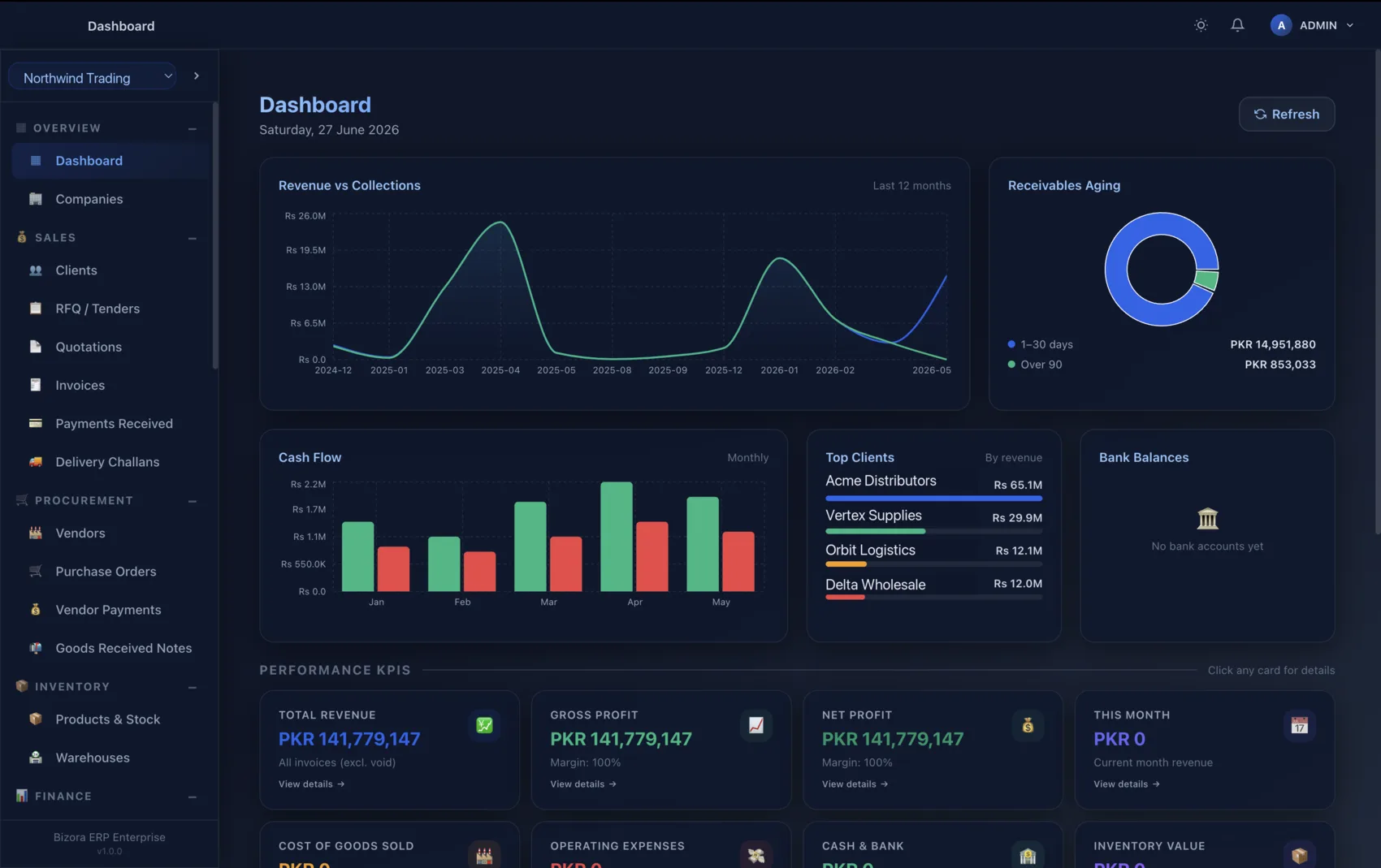
Live KPIs — revenue, receivables, cash flow, inventory value and more, at a glance.
Accounting
Double-entry ledger, chart of accounts, journals, trial balance, P&L and balance sheet.
Inventory
Live stock, goods movements, delivery challans and reorder alerts.
Procurement
RFQ → purchase order → goods receipt, with full vendor management and payments.
Invoicing
Quotations, invoices, payments and AR/AP — auto-posted to the ledger.
Payroll & HR
Employees, payroll runs, payslips and leave on shared books — Professional and Enterprise.
Multi-company
Up to 3 companies on Professional; unlimited companies with intercompany transactions on Enterprise.
Security & roles
Audit logs, signed offline licences and verified backups; users and roles on Professional and Enterprise.
Why Bizora ERP
Enterprise control, without the enterprise baggage
Your data stays yours — offline-first
Your books live in a local database on your own machine. No mandatory cloud, no third-party access.
One always-balanced ledger
Every module posts to the same double-entry engine. No integrations, no sync errors.
No monthly billing
A 1-year or 3-year licence per edition. 15-day Professional trial, no card.
Native Windows & macOS
A real desktop app for Windows 10/11 and macOS 13+ (Apple Silicon & Intel).
Built to scale
From 1 user / 1 company on Starter to 25 users / unlimited companies on Enterprise.
Audit-ready
An audit log of sign-ins, role changes, voids, restores and reconciliations, who-created and who-changed stamps on every document, and one-click verified backup and restore.
One team, one system
Built for every business role
Finance, procurement, sales and the warehouse all work from the same always-balanced ledger — so everyone sees the same numbers, in real time, on your own machines.


Finance Manager
Ledgers, P&L, receivables and cash flow — auto-posted and always balanced.

Procurement Officer
RFQ to purchase order to goods receipt, with vendors and payments in one place.

Sales Executive
Quotations, invoices and payments that post straight to the books.

Inventory Manager
Stock, movements and reorder alerts in real time.

Business Owner
Live KPIs across every company — on your own machines, with your data under your control.
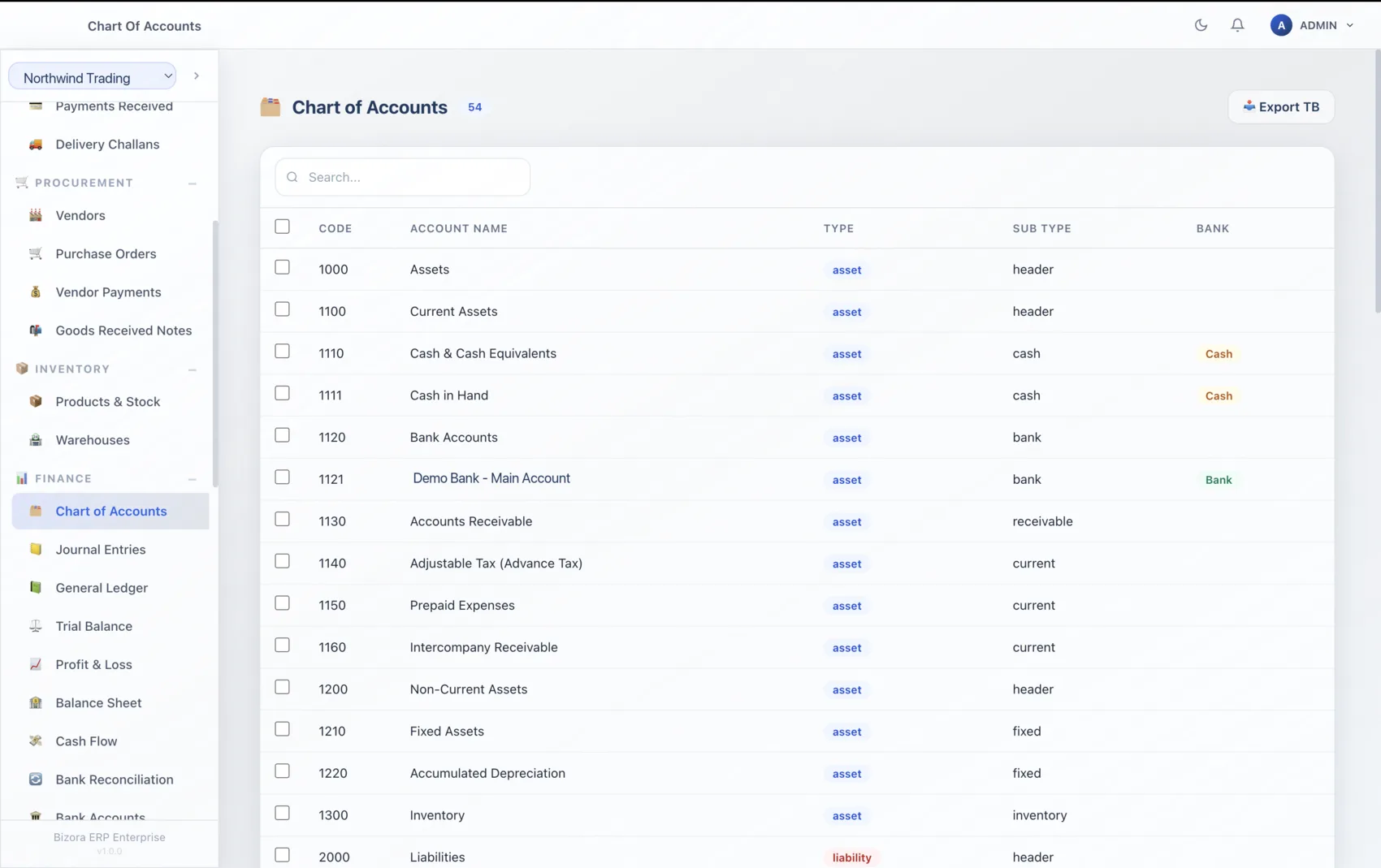
Accounting & Finance
Books you can trust, every period
A complete double-entry accounting core powers the whole platform — so the numbers are always right at month-end, audit and tax time.
- Customisable chart of accounts with manual journals
- Trial balance, profit & loss and balance sheet on demand
- Fiscal-year close with auto-posted retained earnings
- GST / withholding tax recording, ready for FBR workflows
Inventory & Procurement
From RFQ to goods received — in one flow
Track every SKU and run the full procure-to-pay cycle without leaving the app.
- Real-time stock with reorder alerts
- Goods movements, delivery challans and stock adjustments
- RFQ → purchase order → goods-received notes
- Vendor management and vendor payments, posted to the ledger
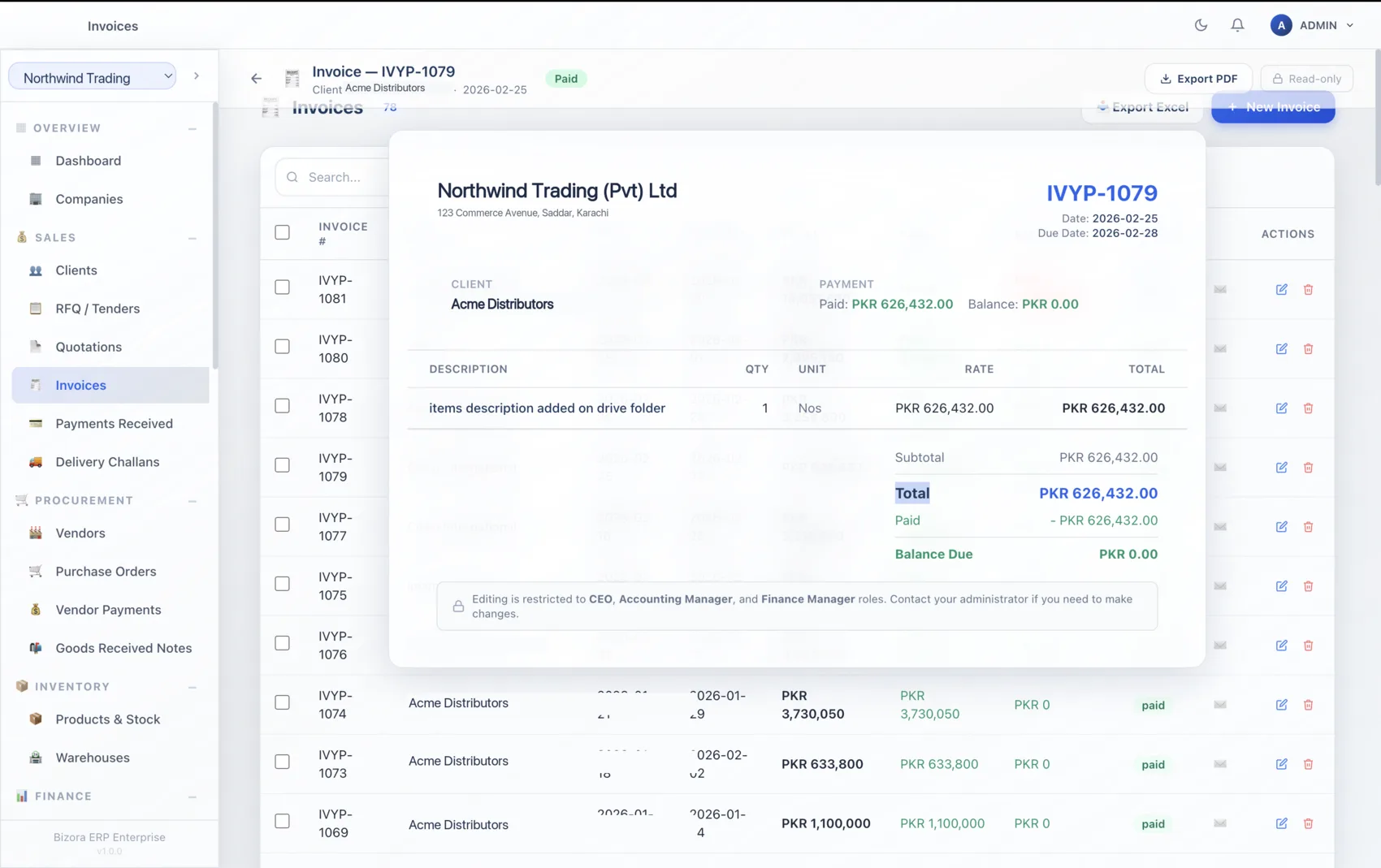
Sales & Invoicing
Quote, invoice and get paid faster
Turn quotations into invoices, record payments, and keep receivables and payables current — automatically reflected in your accounts.
- Professional quotations that convert to invoices
- Payments received, AR / AP and withholding tax
- Clean PDF documents for customers
- Every transaction auto-posted to the general ledger
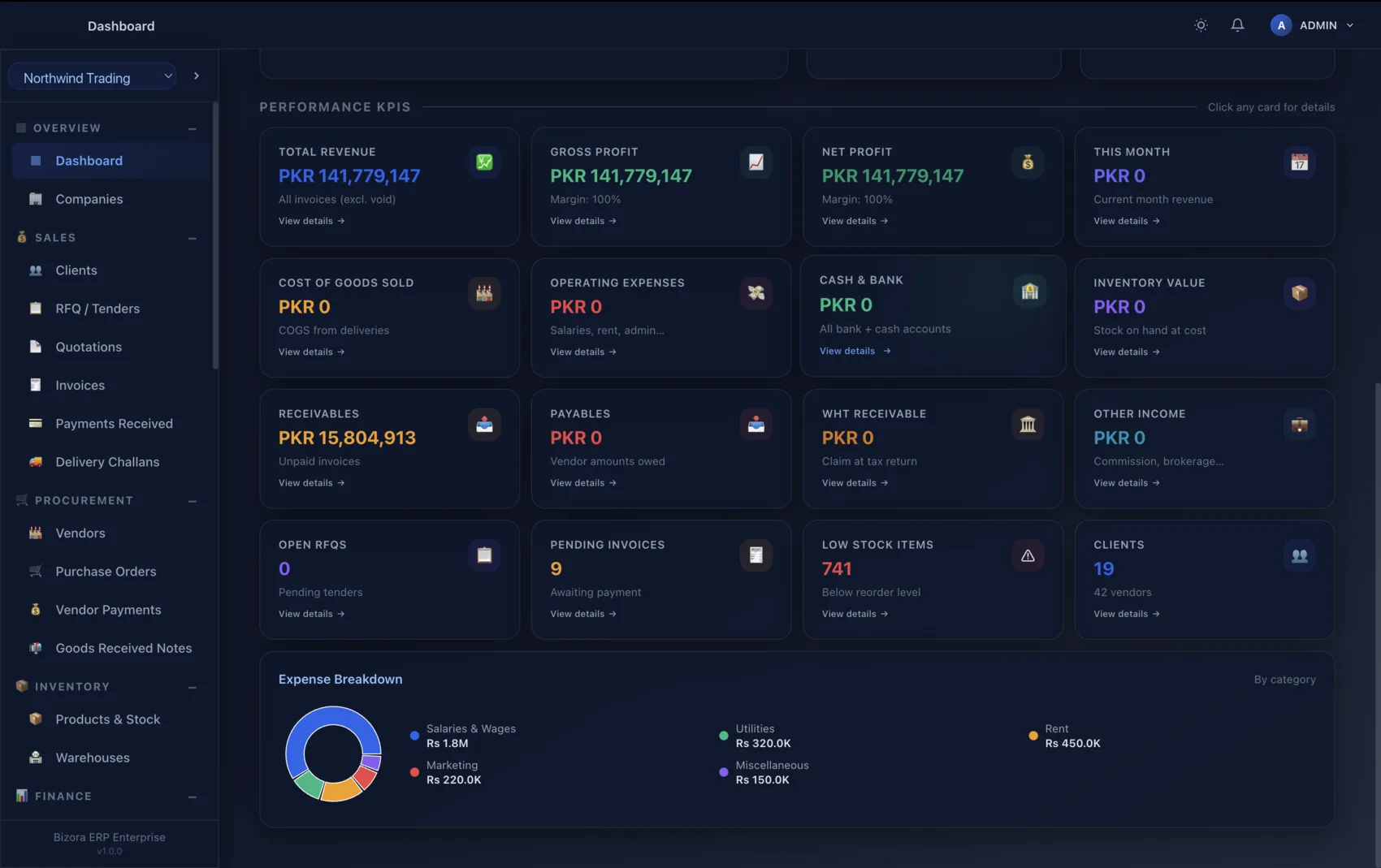
Reports & Analytics
Decisions backed by real numbers
A live dashboard plus built-in reports across every module — exportable whenever you need them.
- Real-time KPIs: revenue, profit, cash, receivables, stock
- Financial statements and module reports built in
- Customer and vendor statements
- One-click export to PDF and Excel
Payroll & HR
Pay your team on the same books
Included in Professional and Enterprise. Employees, payroll runs with statutory deductions, and disbursement from the bank you choose.
Employee records, payroll runs, payslips and leave — all sharing the same ledger, so payroll posts itself with no duplicate entry.
Employee records
Central register of staff, roles and pay structures.
Payroll runs
Process payroll and generate payslips in a few clicks.
Leave
Track leave balances alongside payroll.
Auto-posted
Salaries and deductions flow straight into accounting.
Security & Offline ownership
Your data never leaves your machine
Offline-first by design — with signed licences, role-based access and verified backups keeping your business fully under your control.
Local SQLite database
All data stored on your device. No cloud sync, no third-party access.
Signed offline licences
Cryptographically signed and tied to the machine — verified without phone-home.
Role-based access
Users, roles and permissions on Professional and Enterprise; sensitive changes captured in the audit log.
Verified backups
One-click backup and restore; every backup is read back and verified before it counts as saved.
Full audit trail
Sign-ins, role changes, voids, restores and reconciliations are logged; every document records who created and who changed it.
Safe factory reset
Clean reset wipes data deliberately — no orphaned records left behind.
Built for real businesses
Made for SMEs, distributors & service teams
Bizora ERP fits the way smaller businesses actually operate — practical, fast to set up, and your data stays on your machines.
Compare editionsMulti-company & Multi-currency
Run the whole group from one licence
Manage many legal entities under one Enterprise licence, keep each company's books clean, and move between them in a click.
- Unlimited companies on Enterprise
- Intercompany support across entities
- Per-company chart of accounts and reporting
Offline-first · 100% yours
Your data stays yours.
No cloud dependency, no monthly fees, no vendor holding your books. Bizora ERP installs on your computer and stays there — working with or without the internet.
Editions & Pricing
Choose the edition that fits your business
Every edition runs the same trade and double-entry accounting core. Higher editions raise the user and company limits and add HR & payroll, fixed assets, roles & permissions and consolidated reporting.
Starter
- Full buy → stock → sell → collect cycle
- Quotations, purchase orders, goods receipts & delivery notes
- Invoicing, receipts, vendor bills & payments
- Inventory with real stock control
- Double-entry accounting, Trial Balance, P&L, Balance Sheet
- GST & withholding-tax essentials
- Multi-deduction receipts (WHT, GST withheld, retention)
- Audit log & document provenance on every record
- One-click backup & restore with archive verification
- Offline-first — your data stays on your machine
Professional
- Everything in Starter
- HR, Payroll & Leave
- Fixed assets & depreciation
- Users, roles & permissions
- Consolidated multi-company reports
- Priority support
Enterprise
- Everything in Professional
- Intercompany transactions between your companies
- Enterprise support
1-year or 3-year licence — one payment for the term. 15-day Professional trial · no credit card.
Industries we serve
Built for the businesses that buy, stock and sell
Use cases
How teams put Bizora ERP to work
The growing distributor
Manages thousands of SKUs, runs RFQ-to-PO daily, and watches margins and receivables on the live dashboard — without a cloud bill.
The services firm
Quotes, invoices and collects faster while payroll and accounting share one ledger, so month-end closes cleanly with a full audit trail.
The multi-entity group
Runs several legal entities on a single Enterprise licence with intercompany support, keeping each company's books separate yet consolidated.
Download
Get Bizora ERP on your desktop today
Native installers for Windows and macOS. 15-day Professional trial, no credit card.
Windows
Windows 10 / 11 · 64-bit
64-bit installer for Windows 10 and 11. Installers are released with version 1.0 — request one and we send the download link with your 15-day trial.
macOS
macOS 13+ · Apple Silicon & Intel
Installers are released with version 1.0 — request one and we send the download link with your 15-day trial. Apple Silicon Macs use M1, M2, M3 or M4 chips. Intel Macs are older Macs. Not sure? Apple menu → About This Mac → check the “Chip” line.
FAQ
Common questions
Does Bizora ERP work fully offline?
Yes. It's an offline-first desktop app with a local database. No internet is required to use it after activation — your data stays on your machine.
Which platforms are supported?
Native apps for Windows 10/11 (x64) and macOS 13 Ventura or later, running on both Apple Silicon and Intel Macs.
Is it a subscription?
Bizora ERP is sold as a 1-year or 3-year licence per edition. You can start with a free 15-day trial of the Professional edition — no credit card required.
Where is my data stored?
In a local SQLite database on your own computer. There is no cloud sync and no third-party access. You can make a verified backup archive anytime.
How many companies can I run?
Starter: 1 company. Professional: up to 3. Enterprise: unlimited companies with intercompany transfers between them.
Does it handle my country's sales tax (Pakistan GST / FBR, UAE VAT, others)?
Yes. Tax codes are configurable per company: Pakistan (GST, FBR, withholding), UAE (VAT, FTA) and a generic profile ship as starting sets, and you can define your own codes, rates and posting accounts. Output and input tax are tracked per code, with exports for filing.
Take control of your business — on your own desktop
Download Bizora ERP and run the full Professional edition free for 15 days, or talk to our team about the right edition for you.